Print shift sheets and the DSR
Print a locked shift's sheet on an A4 page or an 80 mm receipt, and print the Daily Sales Register for every shift of a business day.
On this page
This page shows how to print the shift sheet for a locked shift, on A4 paper or an 80 mm receipt printer, and how to print the Daily Sales Register (DSR) for a business day.
Before you start
- To open a shift sheet from the Shifts screen you need the Shifts permission. To open the DSR on the Reports screen you need the Reports permission. See Roles and permissions.
- Set up your printer in Windows first. The app prints through the normal Windows print window.
Print a shift sheet
The shift sheet opens for a shift that is Locked. An Open or Counting shift opens the closing screen instead.
- Select Shifts in the sidebar.
- Select a Locked shift. The sheet opens, titled with the shift and date, for example Morning shift, 22 Nov.
- In the Paper list, choose A4 page or 80 mm receipt. The sheet on screen changes to match.
- Select Print.
- In the Windows print window, choose the printer and print.
This PC remembers the paper you chose last.
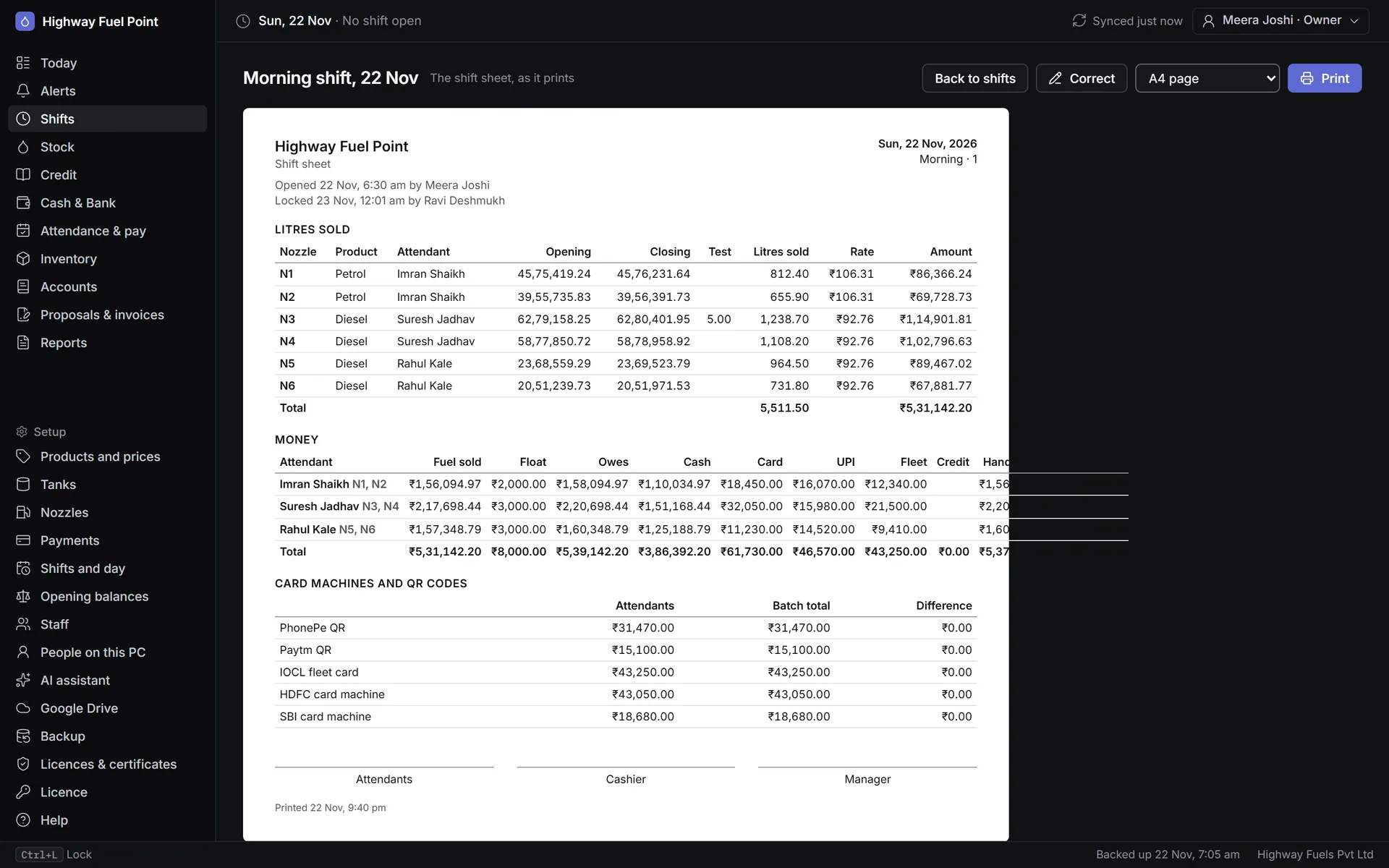
What the A4 sheet shows
- The top: the station name, the date, the shift, who opened it and when, and who locked it and when. A corrected shift also shows Corrected · Revision 2 (or the revision number).
- Litres sold: one row per nozzle with Product, Attendant, Opening, Closing, Test, Litres sold, Rate and Amount, and a Total.
- Money: one row per attendant with Fuel sold, Float, Owes, Cash, Card, UPI, Fleet, Credit, Handed over and Difference, and a Total. A minus difference is a shortage.
- Card machines and QR codes: for each one, what the Attendants took, the Batch total and the Difference.
- Corrections: one line for each correction, for example "Revision 2, approved by Ravi Deshmukh: N3 meter misread". See Correct a locked shift.
- Signature lines for Attendants, Cashier and Manager, and the time it was printed.
What the 80 mm receipt shows
The receipt has the same figures in a narrow column:
- for each nozzle: opening, closing, test litres if any, litres sold at the rate, and the amount;
- for each attendant: Owes, each way they were paid, Handed over, and Short, Excess or Tallied;
- totals for litres and amount, and the total short and excess;
- any corrections, a Manager signature line and the time it was printed.
Reprints
A locked shift prints from the figures saved when it was locked, or at its latest correction. A reprint next month shows exactly what was printed today. If the shift was corrected, the reprint shows the new revision and the reason.
Print the Daily Sales Register
The Daily Sales Register (DSR) shows every shift of one business day together, nozzle by nozzle.
- Select Reports in the sidebar.
- Select the Daily Sales Register tab.
- In Business date, choose the day. It starts at the latest day that has shifts.
- Check the register on screen.
- Select Print. The DSR always prints on A4.
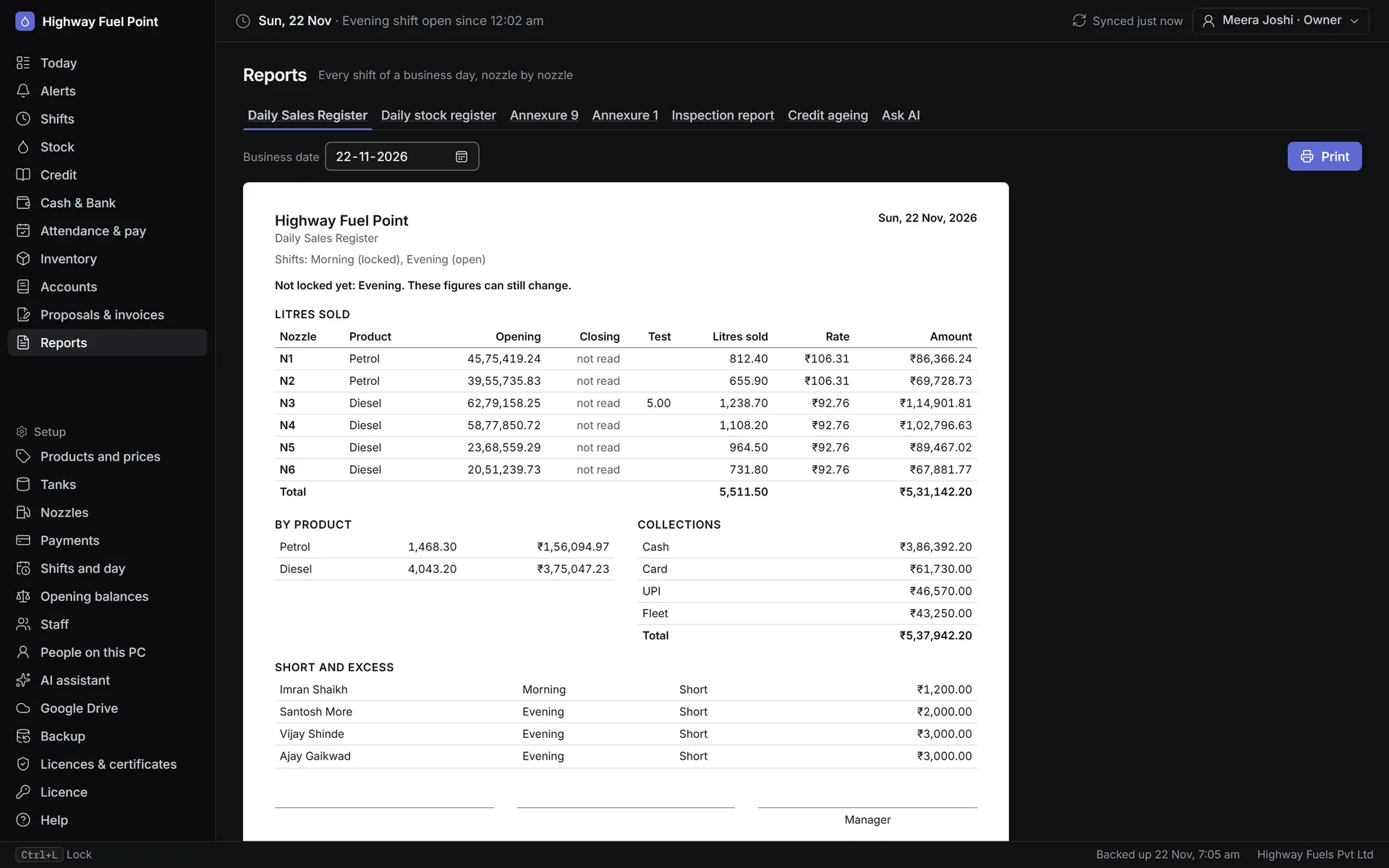
What the DSR shows
- The top: the station name, the date, and the shifts of the day with their state, for example "Shifts: Morning (locked), Evening (open)". If the day is closed, it says who closed it, like Day closed by Ravi Deshmukh.
- Litres sold: one row per nozzle for the whole day. Opening is the first shift's opening and Closing is the last shift's closing. Test, Litres sold and Amount add up all shifts. If the price changed during the day, Rate shows varied.
- By product: litres and amount for each product.
- Collections: Cash, and Card, UPI, Fleet and Credit when there were any, with a Total.
- Short and excess: each attendant who was short or had excess, with the shift and the amount. If nobody was, it says Everyone tallied.
- A Manager signature line and the time it was printed.
When Google Drive is connected, the Reports screen also has a button to send the figures to Google Sheets. See Google Drive and Sheets. For the other registers on the Reports screen, see Reports and Registers and inspections.
Something here does not match your screen, or a step is unclear? Tell us and we will fix the page.