Morning checks
Record each tank's dip, water dip and density at 15 °C, and each nozzle's 5-litre test, before the 10:00 density deadline.
On this page
Every morning, before sales start, the station checks its tanks and nozzles. This page shows how to record those checks in PetroKhata. Anyone with the Stock permission can do it. By default that is the Owner, Managers and Supervisors.
Before you start
- Each tank needs a dip chart. Without one, PetroKhata cannot turn a dip into litres. See Tanks and dip charts.
- Your tanks and nozzles must be set up. If they are not, the screen says Add tanks and nozzles in Setup first.
- Keep the dip rod, hydrometer, thermometer and the 5-litre measure ready.
Open the morning checks
- Select Stock in the left menu.
- The Morning checks tab opens.
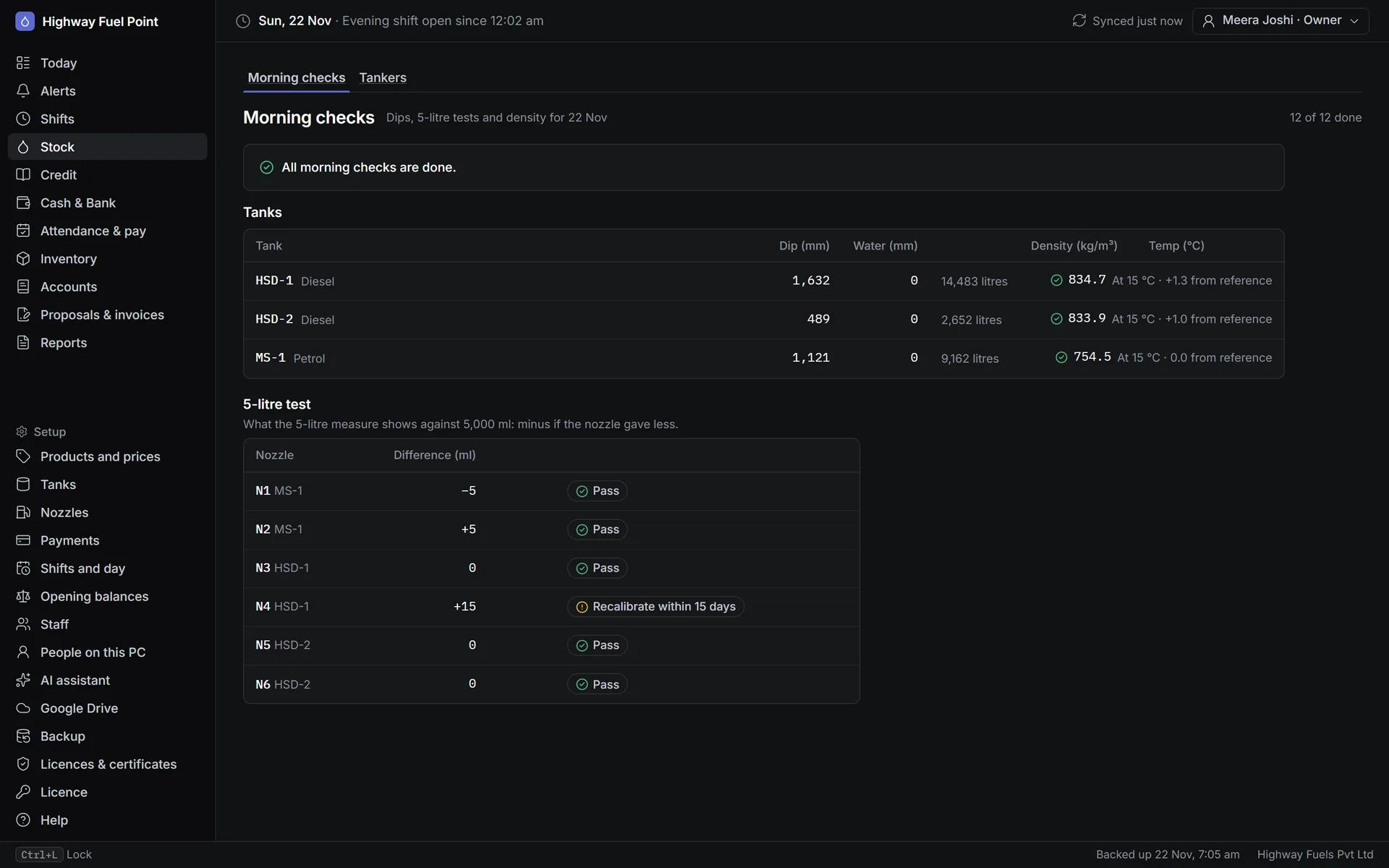
The heading shows today's date. On the right you see how many checks are done, for example "5 of 12 done". Each tank counts twice (dip and density). Each nozzle counts once (5-litre test).
The Tanks card on Today also shows this count, for example "Morning checks 5 of 12".
When everything is done, the screen says All morning checks are done.
Record the dip and water dip
Do this for every tank, in the Tanks table.
- Find the tank's row.
- Type the product dip in whole millimetres under Dip (mm).
- Type the water dip under Water (mm). It starts at 0. Leave it at 0 if there is no water.
- Select Save.
The litres appear beside the dip. PetroKhata works them out from the tank's dip chart and takes away the water.
PetroKhata refuses a dip it cannot use:
- a water dip higher than the product dip;
- a dip above the top of the tank's dip chart.
If you find water
If the water dip is more than 0 mm:
- the tank shows On hold: water found;
- PetroKhata raises a critical alert, Water found in a tank. The Owner's phone app gets it too.
A tanker cannot be received into a tank that is on hold for water.
Release a tank from hold
When the water problem is dealt with, a Manager or the Owner releases the tank.
- Select Release beside the tank.
- Under What was done, write what was done. This is required.
- Under Who is approving, choose the Manager or the Owner.
- They type their PIN.
The screen says, for example, "MS-1 is back in use." The water alert is marked as dealt with.
You do not see Release for a tank that shows On hold: decanting. That hold ends when the tanker is finished or rejected. See Receive a tanker.
Take the density
Do this for every tank. Take the sample, then read the hydrometer and the thermometer.
- Type the hydrometer reading under Density (kg/m³), with one decimal, for example 745.2.
- Type the sample temperature under Temp (°C), for example 30.0.
- Select Save.
PetroKhata shows the density corrected to 15 °C, marked At 15 °C. If the tank has a reference density, it also shows the difference, for example "+1.3 from reference".
For petrol and diesel, PetroKhata checks the density against the allowed range for the product. If it is outside, you see Outside the range for this product, and a critical alert is raised: Density outside the product range.
If the reading is outside what the density table covers, PetroKhata refuses it. Check the hydrometer and thermometer, and type the reading again.
The 10:00 deadline
The morning density for each tank is due by 10:00.
- From 09:15, a banner says, for example: "Density for MS-1 is due by 10:00."
- After 10:00, the banner says: "Density for MS-1 was not taken by 10:00. It is recorded as missed; take it now."
PetroKhata does not stop sales when the density is late. You can still save it after 10:00. Annexure 1 lists the days of the month that have no morning density. See Registers and inspections.
Take the reference density after a tanker
After a tanker is received, the tank needs a new reference density. The section Reference density after a delivery appears with a row for each such tank.
Wait until 50 litres have been sold from the tank since decanting. PetroKhata shows the row as soon as the delivery is complete, so you judge the 50 litres yourself.
- Type the hydrometer reading under Density (kg/m³).
- Type the temperature under Temp (°C).
- Select Save.
The row goes away. From then on, morning densities for that tank are compared with this reference.
Do the 5-litre test
Do this for every nozzle, in the 5-litre test table.
- Draw 5 litres from the nozzle into the measure.
- Read how far the measure is from 5,000 ml.
- Type the difference in ml under Difference (ml). Use a minus sign if the nozzle gave less. For example, if the measure shows 4,990 ml, type -10.
- Select Save.
The result appears beside the nozzle:
| Difference | Result | What PetroKhata does |
|---|---|---|
| 10 ml or less, either way | Pass | Nothing more. |
| More than 10 ml over, or 11 to 25 ml short | Recalibrate within 15 days | Raises a "needs action" alert, A nozzle needs recalibration, with the date it is due by. |
| More than 25 ml short | Switched off | Turns the nozzle off and raises a critical alert, A nozzle failed its 5-litre test and was switched off. |
A nozzle that is off shows Off. After it is repaired and checked, someone with the Setup permission turns it back on: open Setup → Nozzles, select the nozzle, then select Turn back on. See Dispensers and nozzles.
Related pages
Something here does not match your screen, or a step is unclear? Tell us and we will fix the page.